We have built a facebook style “messenger” into our web site which uses cassandra as storage backend. I’m describing the data schema to server as a simple example how cassandra (and nosql in general) can be used in practice.
Here’s a diagram on the two column families and what kind of data they contain. Data is modelled into two different column families: TalkMessages and TalkLastMessages. Read more for deeper explanation what the fields are.
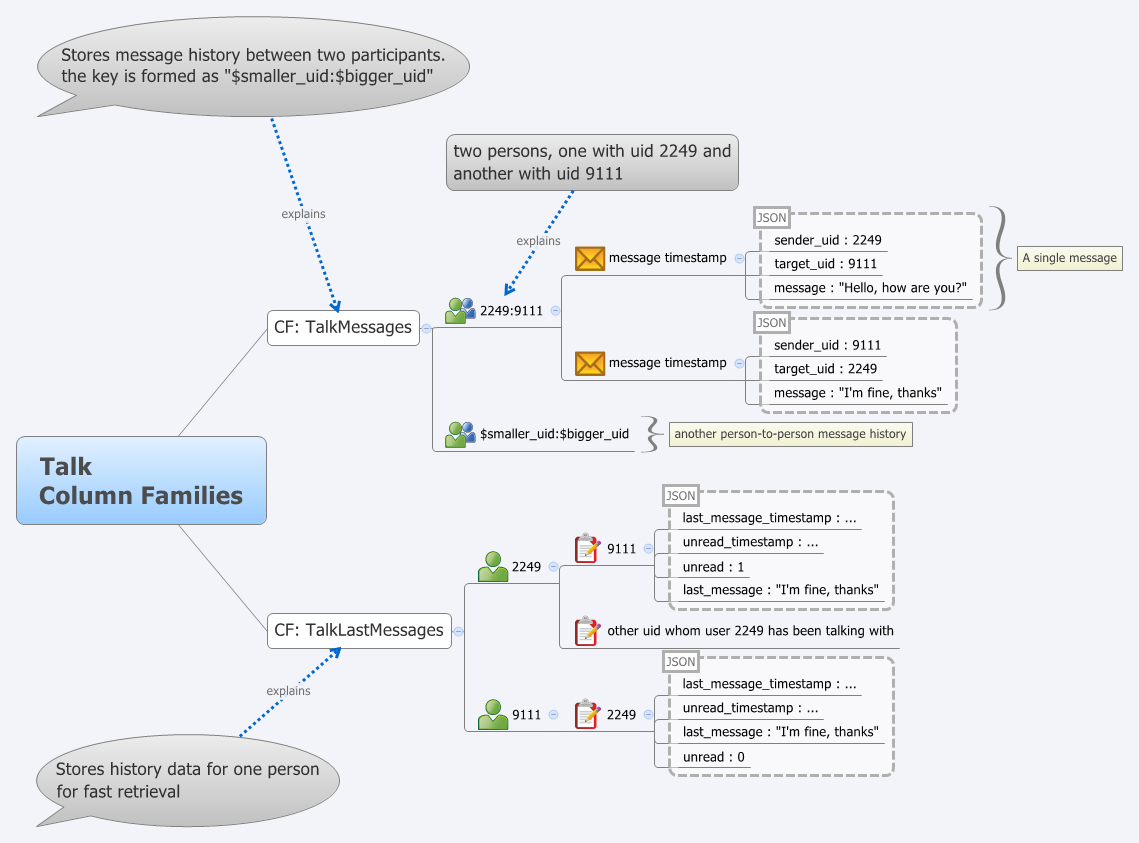
TalkMessages contains each message between two participants. The key is a string built from the two users uids “$smaller_uid:$bigger_uid”. Each column inside this CF contains a single message. The column name is the message timestamp in microseconds since epoch stored as LongType. The column value is a JSON encoded string containing following fields: sender_uid, target_uid, msg.
This results in following structure inside the column family.
"2249:9111" => [
  12345678 : { sender_uid : 2249, target_uid : 9111, msg : "Hello, how are you?" },
  12345679 : { sender_uid : 9111, target_uid : 2249, msg : "I'm fine, thanks" }
]
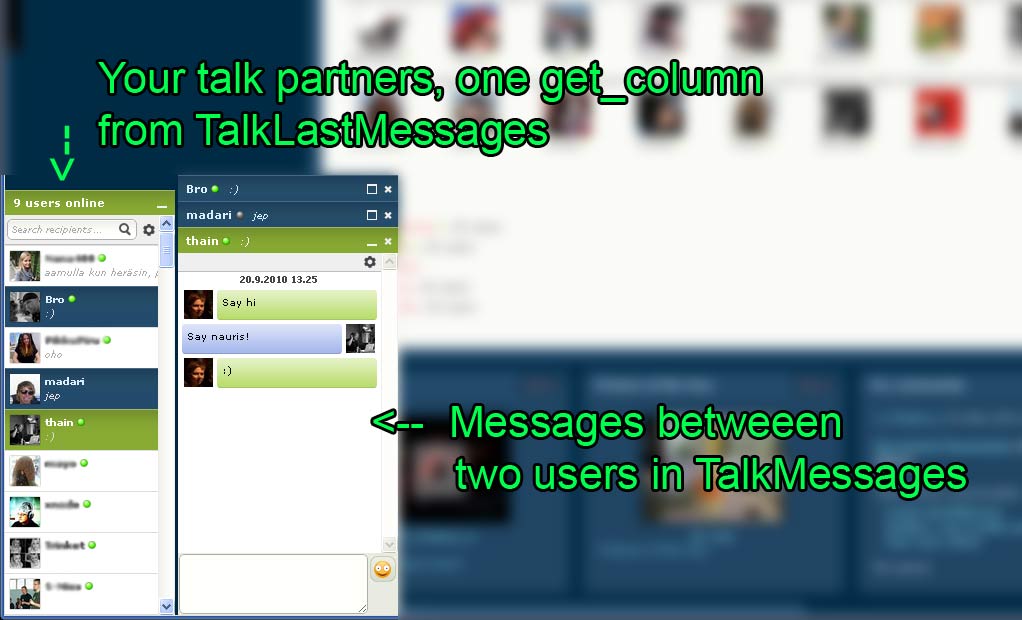
TalkLastMessages is used to quickly fetch users talk partners, the last message which was sent between the peers and other similar data. This allows us to quickly fetch all needed data which is needed to display a “main view” for all online friends with just one query to cassandra. This column family uses the user uid as its key. Each column
represents a talk partner whom the user has been talking to and it uses the talk partner uid as the column name. Column value is a json packed structure which contains following fields:
- last message timestamp: microseconds since epoch when a message was last sent between these two users.
- unread timestamp : microseconds since epoch when the first unread message was sent between these two users.
- unread : counter how many unread messages there are.
- last message : last message between these two users.
This results in following structure inside the column family for these
two example users: 2249 and 9111.
"2249" => [
  9111 : { last_message_timestamp : 12345679, unread_timestamp : 12345679, unread : 1, last_message: "I'm fine, thanks" }

],
"9111" => [
  2249 : { last_message_timestamp :  12345679, unread_timestamp : 12345679, unread : 0, last_message: "I'm fine, thanks" }
]
Displaying chat (this happends on every page load, needs to be fast)
- Fetch all columns from TalkLastMessages for the user
Display messages history between two participants:
- Fetch last n columns from TalkMessages for the relevant “$smaller_uid:$bigger_uid” row.
Mark all sent messages from another participant as read (when you read the messages)
- Get column $sender_uid from row $reader_uid from TalkLastMessages
- Update the JSON payload and insert the column back
Sending message involves the following operations:
- Insert new column to TalkMessages
- Fetch relevant column from TalkLastMessages from $target_uid row with $sender_uid column
- Update the column json payload and insert it back to TalkLastMessages
- Fetch relevant column from TalkLastMessages from $sender_uid row with $target_uid column
- Update the column json payload and insert it back to TalkLastMessages
There are also other operations and the actual payload is a bit more complex.
I’m happy to answer questions if somebody is interested :)
1. This model do not address natural racing between send a message and mark as read operations, which is common case in chat like application, like yours. So you will eventually have disappearing transactions. Read and write roundtrip takes a couple milliseconds and is not atomic in cassandra.
2. This model do not address max row limit of cassandra. What if some (spammer) sends another million of messages to a single party ?
3. Are you using special clock hardware to deal with microseconds ? System clock do not have enough resolution to provide you with correct microseconds. Typically the best you can get on single server is 1ms precision. Also keep in mind, that if you employ several servers, the best you can get from NTP is about 6ms clock sync. This is comparable to time of cassandra operations, so you have a chance of disappearing messages, because only timestamp is used for their id. What if 2 users file a message to each other with the same timestamp. This happens from time to time especially when you experiance some net or server hiccups.
So, in practice this is not so simple in noSQL world, especially at big scale.
good example and nice use of Cassandra.
very helpful.
That’s understandable that money can make us independent. But how to act when someone doesn’t have cash? The one way is to try to get the loans or just financial loan.
how to Fetch latest n columns having timestamp as column key using hector client